

Browser-based tool · Free core workflow

Free Canvas Size Calculator for Artists

Upload a reference or enter its dimensions to find the best standard canvas size. Compare imperial and metric options, then preview the actual edges removed by a centered crop.

Use Free Canvas Size Calculator for Artists

Loading this tool…

About Free Canvas Size Calculator for Artists

The Canvas Size Calculator for Artists compares a reference photo or entered aspect ratio with standard imperial and metric canvases, ranks the closest surfaces, and previews the actual edges removed by a centered crop.

What Is a Canvas Size Calculator for Artists?

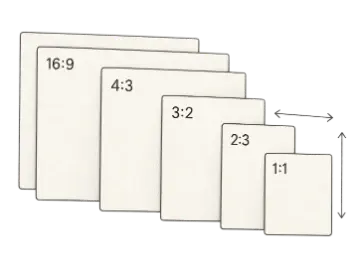
A canvas size calculator for artists helps match the shape of a photograph, sketch, or digital composition to canvases sold in standard dimensions. A close ratio match preserves more of the original framing; a poor match requires cropping an edge, adding space, or altering the design. The calculator compares proportions rather than assuming that the largest surface is automatically the best fit, which makes it useful before purchasing materials or promising a commission size.

How Canvas Matching and Crop Difference Work

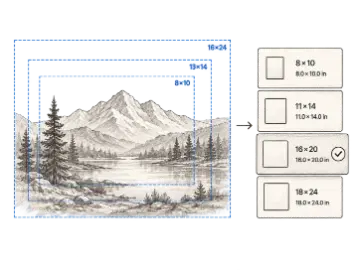
Upload a reference photo or enter the width and height of the composition you want to preserve. Art Grid Maker compares that ratio with 28 common imperial and metric canvas formats and ranks them by the estimated source area removed by a centered cover crop. With a photo loaded, the preview keeps the visible canvas area clear and shades the exact outer edges that would be removed. An exact match fills the surface without proportional cropping, while a near match may need only a small trim or border.

Choosing Between Cropping, Padding, and a New Size

Cropping works when the outer image area is expendable, while padding preserves the complete reference but creates a border or requires extending the background. If neither option suits the composition, choose a different standard canvas or order a custom surface. Remember that canvas depth, material, priming, and physical availability are separate buying decisions; this calculator focuses on dimensional fit and gives you a short list to investigate with your supplier.

Worked canvas crop example

Compare an exact match with a common near-match before deciding whether cropping is acceptable for the subject.

Example inputs

Source photo
1600 × 1200 px (4:3)
Exact-shape canvas
12 × 9 in (4:3)
Alternate canvas
7 × 5 in (1.4:1)

Exact: 12 ÷ 9 = 1.333 · Alternate: 7 ÷ 5 = 1.4 · centered cover crop ≈ 4.8% of source area

12 × 9 keeps the full composition; 7 × 5 trims the top and bottom.

Use the image preview to judge the shaded edges, not the percentage alone. A small crop can still be unacceptable when a face, hand, signature, or deliberate negative space sits near the boundary.

Common input mistakes

  • Entering dimensions from the original file after making a new crop
  • Assuming the nearest catalog size is always the best composition
  • Reading crop percentage without checking which edges are removed
  • Treating a shape match as proof of sufficient print resolution

Key Features

28 Standard Canvas Sizes

Compare popular imperial, metric, and square artist-canvas formats in one ranked list.

Ratio-Based Ranking

Sort candidates by compositional fit rather than by overall surface area alone.

Estimated Crop Area

Estimate the percentage of the source removed when it is center-cropped to fill a canvas shape.

Live Photo Crop Preview

Upload a reference locally and inspect the exact edges removed by a centered crop for the selected canvas.

Imperial and Metric Options

Review inches and centimeters without maintaining separate comparison notes.

Printable Buying Guide

Prepare an A4 or Letter studio reference when you need to compare options away from the screen.

Understanding canvas matches

The best result protects the subject and supports the intended composition, even when it is not the first size in a catalog.

OptionBest for
Exact ratioNo shape crop
Near ratioSmall adjustment
Different ratioRecompose

How to use Free Canvas Size Calculator for Artists

  1. Step 1

    Load the reference shape

    Upload the uncropped image for a visual preview, or enter its dimensions for ratio-only matching.

  2. Step 2

    Compare ranked canvas matches

    Review exact and near matches before considering surfaces that remove a larger part of the image.

  3. Step 3

    Preview the crop

    Check the shaded edges that would be trimmed and choose the compromise that protects the subject.

When this tool is useful

Buying a canvas

Narrow standard imperial and metric options before visiting an art supplier.

Commission planning

Explain how a client's reference will fit the requested final dimensions.

Print preparation

Select a compatible surface before resizing or extending artwork.

Frequently asked questions

What does a canvas size calculator do?
It compares a reference aspect ratio with standard artist canvas dimensions, ranks close matches, and previews which image edges a centered cover crop would remove.
How do I choose the best canvas size for my reference?
Upload the reference for a live crop preview, or enter its complete width and height for ratio-only matching. Review the highest-ranked sizes and protect important details near the frame instead of choosing by percentage alone.
What common canvas sizes are included?
The list covers 28 imperial, metric, and square artist-canvas options, including familiar sizes such as 8×10, 11×14, 16×20, 18×24, 24×36, 30×40 cm, 40×50 cm, and 50×70 cm.
What if no standard canvas matches exactly?
Choose between a small crop, a border, extending the background, changing the composition, or ordering a custom surface. The visual preview helps reveal which edges each option affects.
Does a close aspect ratio guarantee the right canvas?
No. Ratio fit addresses composition shape only. Also consider physical size, material, depth, primer, support strength, availability, budget, and how the finished work will be displayed.
Can I print the canvas comparison?
Yes. The Pro studio-sheet export creates an A4 or Letter reference you can take to a supplier or keep with commission planning notes.

Keep your studio workflow in one place

Find your canvas match. When you need the paid workflow, unlock printable studio buying sheet.